Multi-entity finance

Apexium Group Consolidation

Bring SAP Business One and other entity ledgers into a group close your finance team can review, approve and trace back to source.

The planned module puts data preparation, intercompany reconciliation and group reporting in one portal. KDS scopes the connectors, reports and controls around each group’s close process.

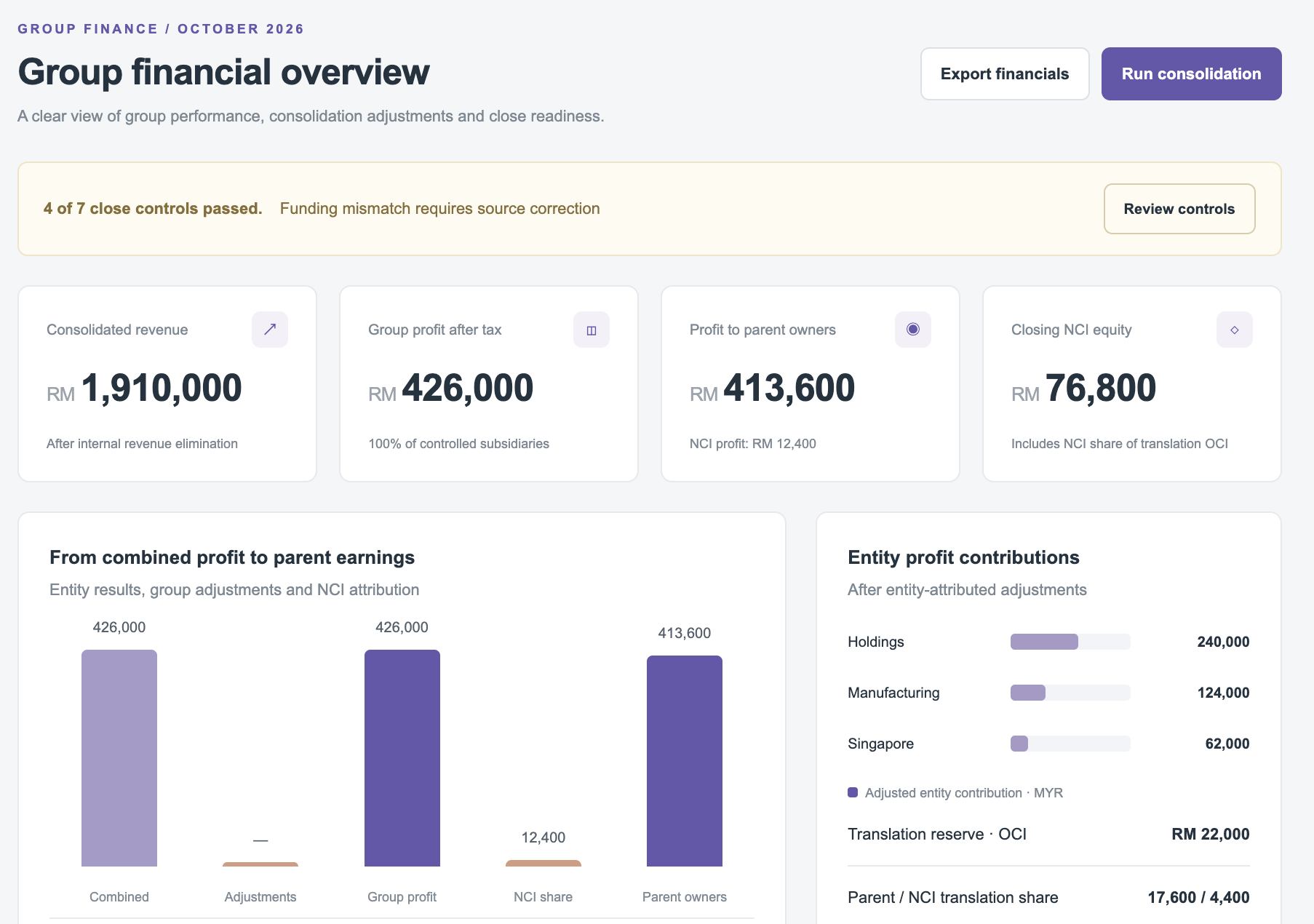
Illustrative group finance dashboard showing close controls, consolidated revenue, group profit, amounts attributable to parent owners and non-controlling interests, and entity contributions
Illustrative consolidation dashboard with sample figures. View full-size image

What the consolidation module is designed to support

Collect and validate entity data

Bring SAP Business One general ledger data into a staging area. For entities on other systems, the planned intake uses approved Excel or CSV trial balances. Check reporting periods, completeness and balanced totals before consolidation.

Map to the group chart of accounts

Map local accounts to group reporting lines while preserving the source entity, period and currency. Flag unmapped accounts and document changes to mappings before review.

Reconcile and eliminate intercompany activity

Compare balances and transactions by counterparty. Assign mismatches to the relevant entity for review. Post agreed eliminations for balances or internal trading in the consolidation layer.

Apply currency and ownership rules

Configure the currencies, rates and ownership percentages agreed for the group. Review currency translation differences and the allocation of profit and equity to parent owners and non-controlling interests (NCI).

Review adjustments and close controls

Record group-only adjustments, review exceptions and approve consolidation journals. Lock an approved reporting version and retain a trail of inputs, mappings and journals.

Review and export group reports

Review group and entity contributions in a reporting portal, with Power BI reporting in scope where agreed. Planned outputs include consolidated financial statements, elimination schedules and supporting detail.

From entity submissions to group sign-off

  1. Import each entity’s data, validate the balances and resolve missing group mappings.
  2. Match intercompany balances, investigate differences and agree on the eliminations.
  3. Apply approved adjustments, exchange rates and ownership rules, then run the group roll-up.
  4. Review the consolidated reports and audit trail, then approve and lock the reporting version.

Example: an intercompany funding mismatch

The dashboard flags the difference in the close controls. Finance compares the two entity balances, agrees which source entry needs correction, then reruns the control before approving the elimination.

Scope your group close with KDS

Bring your entity structure, source systems, currencies, trial balance layouts and current consolidation workbook. We can use them to map your inputs, review steps and reporting outputs.

Talk to KDS